


Why is My Solar App Dead? Tracing the Most Common Causes of Inverter Communication Dropouts
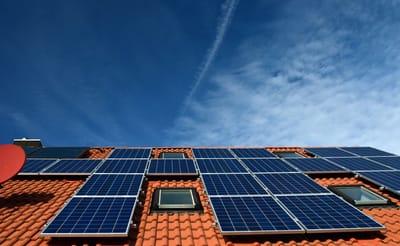
Opening your smart monitoring application only to see a "Gateway Not Reporting" error or a frozen data screen can be incredibly frustrating. When your clean energy metrics flatline, it is easy to panic and assume that your entire hardware array has suffered a catastrophic physical failure. However, experienced technical technicians understand that an "offline" status in your application rarely means your rooftop modules have stopped generating clean electricity. In roughly eighty-five percent of all residential cases, a dead monitoring app is simply the result of a local network dropout—meaning your inverter is still quietly producing power, but it has lost its digital voice.
Modern clean energy systems rely on constant data transmission to report real-time energy metrics, log historical production, and track financial return on investment. When the link between your central gateway and the manufacturer's cloud server snaps, your visibility disappears completely. This expert guide details the most common structural, environmental, and network issues that trigger these annoying communication dropouts, and explains how to safely restore your system’s digital pipeline.
1. Network Modifications and Home Wi-Fi Credential Changes
The single most frequent cause of a sudden communication failure is a localized change to the home internet network. Residential solar data hubs such as an Enphase IQ Gateway or a SolarEdge central inverter—are programmed during your initial professional solar panel installation to lock onto a specific wireless network service set identifier (SSID) and security password.
If you upgrade your home router, switch to a new fiber-optic internet provider, or simply update your wireless network password for enhanced digital security, your solar gateway is instantly locked out. The system has no way of dynamically guessing your updated login details, causing it to drop offline immediately. Furthermore, many modern high-speed internet routers utilize advanced "mesh" technologies that automatically merge 2.4 gigahertz and 5 gigahertz wireless bands under a single name. Because most embedded solar communication chips are engineered to read only 2.4 gigahertz frequencies, they can become completely confused by modern multi-band signals, requiring a targeted manual network split or a dedicated static internet protocol assignment to stabilize data tracking.
2. Power Surges, Localized Outages, and Firmware Glitches
Your home’s electrical panel is subjected to continuous micro-fluctuations in utility line voltage. When localized grid dropouts, lightning strikes, or regional brownouts roll through your neighborhood, they can cause a severe electrical surge that temporarily scrambles the internal cache memory of your solar monitoring gateway.
Just like a residential desktop computer or a smart television, a solar communication board can occasionally lock up due to a minor software processing loop. When this temporary firmware glitch occurs, the system's power generation core continues to invert direct current into usable alternating current flawlessly, but the integrated data transmitter freezes completely. In these specific scenarios, executing a controlled physical system reboot—by safely switching off the dedicated solar circuit breaker in your main service panel for sixty seconds before flipping it back on—is usually all it takes to clear the temporary cache and force a fresh digital handshake with your home internet router.
3. Structural Physical Interference and Signal Decay
The physical placement of your home's networking hardware plays a major role in keeping your monitoring application active. During a professional solar panel installation, your field technicians carefully verify that your wireless router can cast a strong, uninterrupted signal out to the external garage wall or roofline where the main gateway is anchored. However, residential properties are dynamic environments that change structurally over time.
If you complete an interior home renovation, add heavy drywall barriers, install dense radiant barrier insulation in your attic space, or even place a large metal appliance between your indoor router and the outdoor solar inverter enclosure, you can severely degrade the wireless signal path. Over time, environmental shifts like dense spring tree growth or high humidity levels can cause marginal wireless signals to decay completely. If your smart monitoring application routinely drops online and offline throughout the week, it is a clear structural indicator that the physical distance or structural density between your router and the inverter is too high, necessitating the addition of a heavy-duty, outdoor-rated wireless signal extender or a physical Ethernet bridge.
4. Hardware Failure and Microinverter Communication Interference
While local networking issues cause the vast majority of dropouts, homeowners must also look out for deep structural or hardware conflicts. For systems utilizing microinverter architecture, the individual power blocks mounted beneath each panel send their production data down to the main gateway using a technology called Powerline Communication (PLC). This process transmits data signals straight through your home’s existing copper electrical wiring.
If you plug a new heavy-duty appliance into your home—such as a large electric vehicle charger, a variable-speed pool pump, or certain low-grade LED lighting transformers—those devices can inject severe electromagnetic noise into your electrical lines. This high-frequency line noise can completely drown out the delicate data signals passing from your roof to your gateway, resulting in missing or grayed-out panels in your application display. Furthermore, if your gateway unit experiences a direct physical component failure, a blown internal fuse, or severe wire insulation degradation due to nesting rooftop critters, a simple router reset will not resolve the problem.
5. Partnering with Certified Technical Experts for Resolution
If you have carefully stepped through basic network troubleshooting—such as updating your wireless passwords via Bluetooth, verified that your home internet is fully operational, and completed a safe system power cycle—and your monitoring platform remains completely dead, it is time to put down the DIY guides and bring in a qualified professional. Troubleshooting persistent electrical signal drops or deep hardware fault codes requires specialized analytical diagnostic tools that only an elite solar specialist possesses.
By partnering with a licensed regional provider that prioritizes a professional solar panel installation framework, you gain access to certified technical craftsmen who can run advanced wire insulation resistance tests, trace localized electromagnetic line noise, and check for vital manufacturer warranty firmware updates. Entrusting your system's digital health to an elite technical partner ensures your home's electrical structure remains completely safe, guarantees your manufacturer warranties stay fully valid, and ensures your clean energy infrastructure continues to track every single dollar of utility savings for decades to come.
Catégories
Lire la suite
PDF files are one of the most commonly used document formats for professional, educational, and personal work. They help maintain formatting and make document sharing easy across devices. As digital workflows continue to grow, users increasingly look for platforms that provide all PDF tools in one place for quick and efficient file management. One of the most useful features available...

Introduction Digital marketing has become one of the fastest-growing industries in Pakistan. Businesses of every size now depend on online visibility to attract customers and increase sales. Because of this trend, many students, freelancers, and business owners are searching for quality learning opportunities to improve their digital skills. Enrolling in a professional "seo course in lahore" is...

Buy Old Gmail Accounts Buy Are you exploring the digital landscape for a strategic advantage? If so, consider the potential of old Gmail accounts. They may seem like relics from a bygone era, yet they offer unique benefits that modern accounts simply can’t match. As businesses strive to build trust and credibility online, many are turning to these aged accounts as an essential tool in...

In today’s digital environment, accessing and saving multimedia content has become an essential part of everyday online activity. Users are constantly searching for reliable tools that allow them to download videos, audio, and other forms of digital media without compromising quality or security. As content consumption continues to grow, platforms that offer efficient and user-friendly...